First, check Help > About
In NinjaTrader, click Help, then About. If Entitlements doesn’t list Evaluation (Rithmic), import the key with the steps below. If it does, your NinjaTrader login is fine: ask your prop firm or broker to check that the account is active.
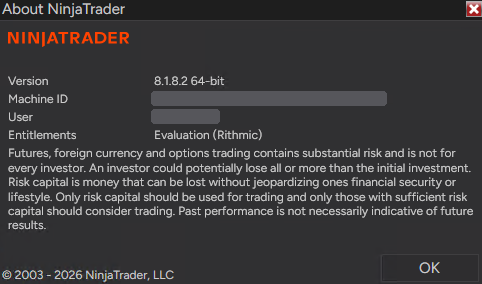
How to import the license key
-
Log in at account.ninjatrader.com
Use your NinjaTrader username and password, not your prop firm or Rithmic login.
-
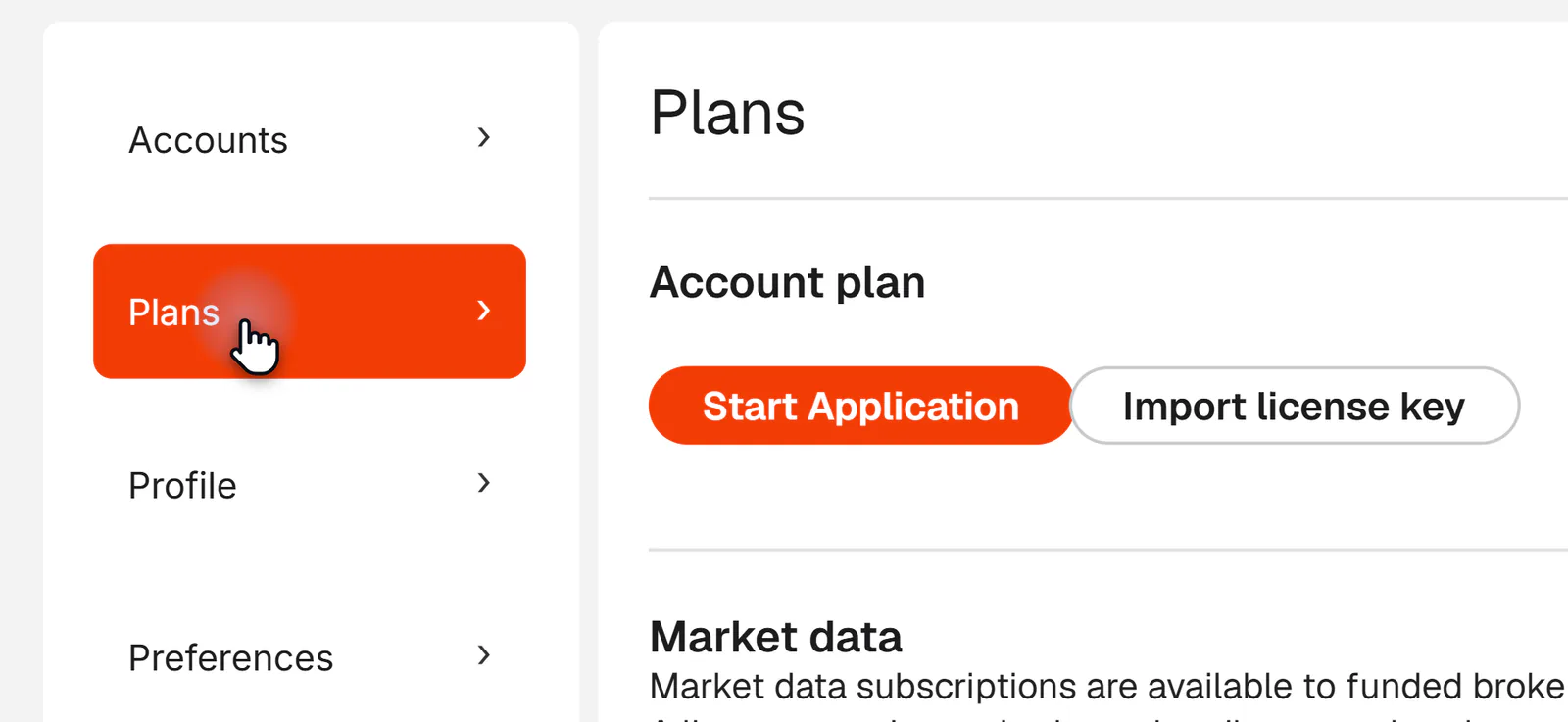
Open Settings > Plans
Click your initials at the top right, then Settings, then Plans.
-
Import the key
Click Import license key, paste the key and click Import. You’ll see “License key imported successfully.”
@APE-XTRA-DERF-UNDI-183T-PR45-LW27-63GE -
Restart NinjaTrader
Close NinjaTrader completely, start it again and log in. Help > About now lists Evaluation (Rithmic). Connect as usual: your accounts are in the Accounts tab.
Questions
- Why does NinjaTrader only show Sim101?
- Sim101 is NinjaTrader’s built-in practice account, so it is always listed. When it is the only account after your Rithmic connection turns green, the Evaluation (Rithmic) entitlement is missing.
- What is the Evaluation (Rithmic) entitlement?
- A permission on your NinjaTrader login that lets NinjaTrader list the accounts from a Rithmic connection. Newly registered NinjaTrader accounts include it; older accounts don’t have it by default.
- Apex account not showing on NinjaTrader?
- Same cause, same fix. It applies to Apex, Lucid, Bulenox, Tradeify, Take Profit Trader and every other Rithmic prop firm or live Rithmic broker. Firm settings are in the Apex Trader Funding guide.
- Do I have to do this for every account?
- No. The entitlement is on your NinjaTrader login, so every Rithmic account you connect with that login shows up.
- I turned off Global Simulation Mode and enabled Multi-provider. Why is it still only Sim101?
- Those settings don’t add the entitlement. Check Help > About and import the license key.
Trading more than one Rithmic prop firm? PropFirmConnector connects Rithmic accounts from different firms in one NinjaTrader 8, at the same time. Find your firm’s setup guide.
Updated . PropFirmConnector is an independent NinjaTrader add-on and is not affiliated with or endorsed by NinjaTrader, Rithmic, or the firms named on this page.