Yes, with PropFirmConnector. Use your FundYourEdge trader code and Rithmic password with System Rithmic Paper Trading (Chicago). Both evaluation and funded accounts remain simulated. FundYourEdge says using NinjaTrader is not a rule violation, but its support team does not set it up or troubleshoot it.
FundYourEdge distinguishes platform support from permission: its help center says NinjaTrader is outside its supported lineup, but using it is not a rule violation. For help with the Rithmic login or an account missing in every platform, contact FundYourEdge. For the PropFirmConnector setup below, use PFC support.
One FundYourEdge Rithmic login can list multiple accounts. The trader code and password belong to that trading login; they are separate from your website and NinjaTrader sign-ins. A funded label does not change FundYourEdge’s simulated environment.
Issued FundYourEdge evaluation account
NinjaTrader cannot connect to this route on its own; FundYourEdge does not support NinjaTrader setup.
PropFirmConnector: Select Rithmic Paper Trading (Chicago) and use the trader code and Rithmic password from your dashboard.
Issued FundYourEdge funded account
The funded stage remains simulated. It does not become a live brokerage account.
PropFirmConnector: Keep Rithmic Paper Trading (Chicago). Confirm the new account is available under your Rithmic login before selecting it in NinjaTrader.
Where to find your FundYourEdge Rithmic login
In your FundYourEdge dashboard, open Accounts and click Show credentials on the “Your Rithmic login” card, which reads “Same login for all your accounts”. Your username is your trader code. Copy it and the password, because both are case-sensitive and a stray space fails the login. This is not your fundyouredge.com website login, and not your NinjaTrader login.
How to connect FundYourEdge to NinjaTrader 8 in 5 steps
01
Find your trader code and complete the data agreements
In your FundYourEdge dashboard, open Accounts and click Show credentials on the “Your Rithmic login” card. Sign in to R|Trader Pro with your trader code and Rithmic password, System Rithmic Paper Trading and Gateway Chicago Area, or the gateway nearest you. Complete both CME agreements and submit your actual trader status: Non-Professional only if you qualify. This one-time step covers the FundYourEdge accounts under that login. Confirm the expected account appears, then close R|Trader Pro for the direct setup below.
02
Install PropFirmConnector
From your PropFirmConnector account, download PropFirmConnector.zip and close NinjaTrader completely. Extract the ZIP, then copy NinjaTrader.Custom-pfc.dll to My Documents\NinjaTrader 8\bin\Custom. Start NinjaTrader again and, when your browser opens, click Activate this device.
Start NinjaTrader 8 and sign in with your NinjaTrader account; a free one works. That’s your NinjaTrader login, not your FundYourEdge trader code.
04
Configure Rithmic for FundYourEdge
In the Control Center, open Connections and click Configure. Double-click Rithmic for NinjaTrader Brokerage in the list on the left, name the connection (for example FundYourEdge) and enter your trader code and password exactly as shown on your dashboard. Leave Connect on start up unchecked, choose Rithmic Paper Trading (Chicago) for System (the same for evaluation and funded accounts), leave Plug-in mode off and click OK.
Connection type
Rithmic for NinjaTrader Brokerage
Connection name
Any name you recognize, such as FundYourEdge
User name and password
The Rithmic credentials issued by FundYourEdge
Connect on start up
Off
System
Rithmic Paper Trading (Chicago)
Plug-in mode
Off
The Username and Password are case-sensitive.
05
Connect and verify the FundYourEdge account
Open Connections and select your FundYourEdge connection. After it turns green, check the Accounts tab for the specific issued account. Sim101 is NinjaTrader’s local simulation account, not your FundYourEdge account. If the expected account is absent, use the account-access checks below before placing orders.
An interface illustration of the FundYourEdge connection after it turns green.
If your FundYourEdge connection is not working
Should Plug-in mode be on or off?
Off. Plug-in mode shares a running R|Trader Pro session with NinjaTrader, which is a different setup from PropFirmConnector’s direct connection. In Connections > Configure, select your Rithmic connection, uncheck Plug-in mode, click OK and connect again. Some firm and Rithmic instructions turn it on for their R|Trader Pro workflow; leave it off for PropFirmConnector.
The connection is green, but the account isn’t in NinjaTrader’s Accounts tab.
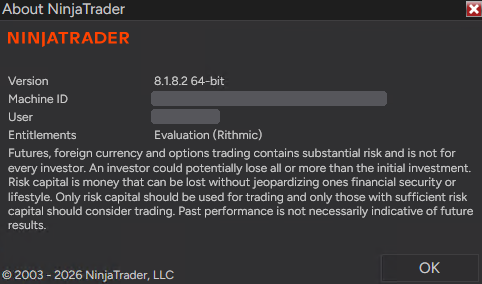
Your NinjaTrader login is probably missing the general Rithmic entitlement, so the Accounts tab often shows only Sim101. In NinjaTrader, open Help > About. The Entitlements line should say Evaluation (Rithmic); if it doesn’t, the connection can turn green without showing your accounts. Older NinjaTrader accounts don’t have this entitlement by default, but newly registered accounts do. The fix is in your NinjaTrader account, not in Rithmic or your firm’s dashboard, and you only do it once. Correct: Entitlements lists Evaluation (Rithmic). Machine ID and User are hidden.
If Evaluation (Rithmic) is missing:
Import this license key at account.ninjatrader.com: click your initials, then Settings > Plans > Import license key. Paste the key, click Import, then close and restart NinjaTrader.
@APE-XTRA-DERF-UNDI-183T-PR45-LW27-63GE
No Import license key button, or still missing? Trading mainly with prop firms? Your NinjaTrader login doesn’t matter, so the fastest fix is to create a new NinjaTrader account with a different email and sign in with it.
Keeping your current login, for example because it has a live account on it? Email platformsupport@ninjatrader.com with your NinjaTrader username and ask them to enable the general Rithmic entitlement.
R|Trader Pro or NinjaTrader rejects your FundYourEdge login.
Copy the trader code and password from the dashboard without extra spaces; both are case-sensitive. Use Rithmic Paper Trading in R|Trader Pro and the Chicago option in NinjaTrader. If R|Trader Pro also rejects them, ask FundYourEdge to check the login and account access before changing the NinjaTrader setup.
Complete both CME agreements and submit the trader-status form in TradeSea or R|Trader Pro, then sign out and back in. Select Non-Professional only if you meet the eligibility criteria. FundYourEdge includes data for eligible non-professionals; professional classification carries monthly exchange fees. If prices remain missing, check the instrument, session and data access.
Prices update, but the expected market depth is missing.
Ask FundYourEdge to confirm the market-depth entitlement for that login and instrument. A successful connection or streaming price does not by itself verify full-depth access. Do not buy an assumed add-on or change Systems based only on an empty depth display.
A newly issued account is missing.
Check whether it appears under the same trader code in R|Trader Pro. If it is missing there too, ask FundYourEdge to verify that the account has been provisioned. If R|Trader Pro shows it but NinjaTrader only shows Sim101, follow the Rithmic entitlement check above. A funded FundYourEdge account still uses the simulated System.
R|Trader Pro works, but NinjaTrader does not connect.
Close R|Trader Pro for this direct setup, check that PropFirmConnector is installed and activated, then confirm the trader code, password, Rithmic Paper Trading (Chicago) and Plug-in mode off. If it still fails, give PFC support the full error text, time, System and whether the account appears in R|Trader Pro. Keep passwords out of screenshots and messages.
You want FundYourEdge accounts alongside another firm.
Count distinct Rithmic usernames. Several accounts under the FundYourEdge trader code share one login; another firm’s login is a separate connection. PropFirmConnector connects them in one NinjaTrader instance. Mirroring orders additionally requires a copier and permission under each firm’s rules.
Correction — October 15, 2026: market-data classification must reflect eligibility. Replaced the unverified Level 2 add-on claim with an entitlement check and clarified account availability at the simulated funded stage. Sources were reviewed; no authenticated trading-account or order-execution test was performed.
FundYourEdge does not provide third-party platform licenses. A free NinjaTrader application account works with this PropFirmConnector setup; the PFC subscription and any separate platform features are distinct purchases.
QIs PropFirmConnector affiliated with FundYourEdge?
No. PropFirmConnector is an independent NinjaTrader add-on and is not affiliated with or endorsed by FundYourEdge, NinjaTrader, or Rithmic.