Connection guide

TradeFunded Connection Guide to NinjaTrader 8

Firm website: tradefunded.com

Quick answer

When TradeFunded issues you Rithmic credentials, yes: select TRADEFUNDED for System in PropFirmConnector and enter the username and password TradeFunded provides. TradeFunded had not launched on September 28, 2026; its site takes waitlist sign-ups only.

Account feed: Rithmic System: TRADEFUNDED Last verified:

This guide covers how to connect TradeFunded Rithmic accounts to NinjaTrader. PropFirmConnector is an independent third-party add-on and is not affiliated with or endorsed by TradeFunded, NinjaTrader, or Rithmic.

Before you start

Your TradeFunded Rithmic account and login

TradeFunded (tradefunded.com) was preparing to launch on September 28, 2026: its site takes waitlist sign-ups, and its roadmap still marks the trading platform as coming soon.

PropFirmConnector already lists TradeFunded’s own Rithmic System, TRADEFUNDED. When TradeFunded issues Rithmic credentials, select it to connect NinjaTrader 8 alongside other firms’ Rithmic logins.

Where to find your TradeFunded Rithmic login

TradeFunded has not yet published where its Rithmic credentials will appear. Use the Rithmic username and password it issues for your account, not your website login.

Visit TradeFunded (opens in a new tab)
Step-by-step setup

How to connect TradeFunded to NinjaTrader 8 in 5 steps

  1. Step 1 One-time activation

    Activate your TradeFunded Rithmic login

    When TradeFunded issues your Rithmic credentials, sign in to R|Trader Pro once and accept the Rithmic market-data agreements, following TradeFunded’s instructions. The direct PropFirmConnector setup below does not require R|Trader Pro to stay open.

  2. Step 2

    Install PropFirmConnector

    From your PropFirmConnector account, download PropFirmConnector.zip and close NinjaTrader completely. Extract the ZIP, then copy NinjaTrader.Custom-pfc.dll to My Documents\NinjaTrader 8\bin\Custom. Start NinjaTrader again and, when your browser opens, click Activate this device.

    Copy the DLL to My Documents\NinjaTrader 8\bin\Custom
    Open your account downloads

    No license yet? Start the free 7-day trial, then download PropFirmConnector from your account.

  3. Step 3

    Open NinjaTrader 8 and sign in

    Start NinjaTrader 8 and sign in with your NinjaTrader account credentials when prompted. These are your NinjaTrader credentials, not the Rithmic username and password issued by TradeFunded.

  4. Step 4

    Configure Rithmic for TradeFunded

    In the NinjaTrader Control Center, select Connections, then configure. Select Rithmic for NinjaTrader Brokerage from the Available list on the left, enter the Rithmic username and password issued by TradeFunded, give the connection a recognizable name, leave Connect on start up and Plug-in mode off, and select TRADEFUNDED for System.

    In the Control Center, click Connections, then configure.
  5. Step 5

    Connect to TradeFunded

    Open Connections again and click the connection name you just created. A green status indicator and the account appearing in NinjaTrader confirm the connection.

    Open Connections and click the name you created. This interface illustration uses TradeFunded and shows the green connected indicator. It is a setup example, not evidence of a live account test.

Enlarged guide image

If your TradeFunded connection is not working

Should Plug-in mode be on or off?
Off. Plug-in mode shares a running R|Trader Pro session with NinjaTrader, which is a different setup from PropFirmConnector’s direct connection. In Connections > Configure, select your Rithmic connection, uncheck Plug-in mode, click OK and connect again. Some firm and Rithmic instructions turn it on for their R|Trader Pro workflow; leave it off for PropFirmConnector.
The connection is green, but the account isn’t in NinjaTrader’s Accounts tab.
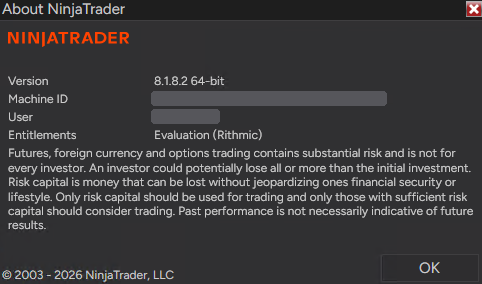
Your NinjaTrader account may be missing the general Rithmic entitlement. In NinjaTrader, open Help > About. The Entitlements line should say Evaluation (Rithmic); if it doesn’t, the connection can turn green without showing your accounts. Older NinjaTrader accounts don’t have this entitlement by default, but newly registered accounts do.
About NinjaTrader window with Entitlements showing Evaluation (Rithmic).
Help > About in NinjaTrader. Entitlements shows Evaluation (Rithmic) when the entitlement is enabled. Machine ID and User are hidden.

If Evaluation (Rithmic) is missing:

  • Trading mainly with prop firms? Your NinjaTrader login doesn’t matter, so the fastest fix is to create a new NinjaTrader account with a different email and sign in with it.
  • Keeping your current login, for example because it has a live account on it? Email platformsupport@ninjatrader.com with your NinjaTrader username and ask them to enable the general Rithmic entitlement.
You do not have Rithmic credentials yet.
TradeFunded had not launched on September 28, 2026; its site takes waitlist sign-ups. This guide applies once TradeFunded issues a Rithmic username and password.

Official TradeFunded resources

FAQ

TradeFunded + NinjaTrader questions

Q Can I use NinjaTrader with TradeFunded?

Once TradeFunded issues Rithmic credentials, yes: PropFirmConnector connects them to NinjaTrader 8 with System TRADEFUNDED.

Q Which System do I select for TradeFunded?

TRADEFUNDED, TradeFunded’s own entry in PropFirmConnector’s Firm list. NinjaTrader’s built-in Rithmic System list does not include it.

Q Is TradeFunded the same as TradeFundrr?

No. TradeFunded (tradefunded.com) and TradeFundrr are different firms with different Rithmic Systems, TRADEFUNDED and TradeFundr.

Q Is PropFirmConnector affiliated with TradeFunded?

No. PropFirmConnector is an independent NinjaTrader add-on and is not affiliated with or endorsed by TradeFunded, NinjaTrader, or Rithmic.

Authenticator verification

Enter your authentication code

Enter the current 6-digit code from your authenticator app.