NinjaTrader Historical Data and Continuous Futures Charts
Find missing futures bars in NinjaTrader 8, download the right date and interval, and see how contract merge settings change prices on a continuous chart.
On this page
If live E-mini S&P 500 (ES) quotes are moving but yesterday’s five-minute chart is blank, open Control Center → Tools → Historical Data. For a chart of last-traded prices, look for Last → Minute records on the missing date under the exact ES expiry. Finding rows for the missing hours gives you a reason to check the chart settings before downloading anything. NinjaTrader’s Historical Data window
Check one missing session
- Write down the full contract month, the chart’s price type and interval, and a date when you expected trades. NinjaTrader counts calendar days in historical requests, so a five-day request can include a weekend. How NinjaTrader loads history
- In the Historical Data window’s Edit section, expand Historical, the instrument and expiry, the price type (Last, Bid or Ask), the interval (Tick, Minute or Day), then the date. Inspect the times in the grid. NinjaTrader’s guide to stored records
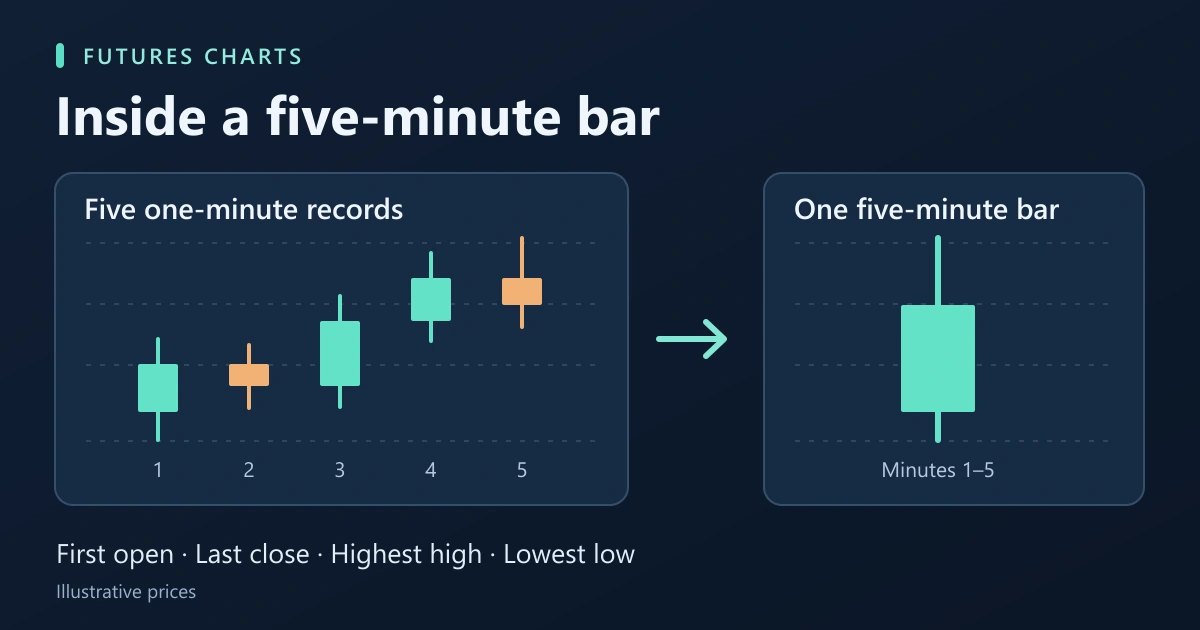
- Match the stored interval to the chart. A five-minute chart uses minute records. A tick chart needs individual ticks. If minute records exist and ticks are missing, check whether your historical provider offers ticks for that period.
If the rows cover the missing time, compare the chart’s contract, end date and Trading Hours template. If they stop early, check the historical provider. NinjaTrader can fill a chart from memory, its disk cache and a provider request. With multiple connections, the preferred historical and real-time connections can differ for futures. Check both preferences in the Market data settings.
Download the missing range
Connect to a provider that offers the required history. In the Historical Data window’s Download section, choose the instrument, start and end dates, interval and price type. For the missing ES session above, start with that expiry, that date, Minute and Last. If the dates cross a rollover and you need one expiry only, check for DoNotMerge before starting. Both merge modes can switch the contract month during a download. Select Download, watch the status in the lower right, then inspect the same date in Edit. NinjaTrader’s download instructions
Protect older local records before expanding the date range. NinjaTrader warns that a download extending beyond the provider’s coverage can remove data you already hold for those dates. You can export the stored records to a text file first. The chart command Reload All Historical Data also overwrites local cache and repository data for the history being reloaded. For a five-minute chart it reloads the base minute interval for charts of that instrument. What a chart reload replaces
Explain a price change at the contract boundary
For a date range spanning a rollover, check the merge policy in the Market data settings. It determines which expiries supply the chart and whether earlier prices are adjusted.
| History needed | Setting and effect |
|---|---|
| One named expiry | DoNotMerge loads only that contract’s history. Available records may start later than the date you requested. |
| Original prices across expiries | MergeNonBackAdjusted joins front months on their rollover dates. The price can step up or down at the join. |
| Adjusted prices across expiries | MergeBackAdjusted uses offsets to join contracts. An older bar can appear at a different level from its original price. |
For example, if the offset applied to June history is +8 points, a June price of 4,990 displays as 4,998 in the adjusted series. To check the June print, inspect June with DoNotMerge. To switch the contract you trade or check working orders and positions, use the futures rollover guide.
PropFirmConnector connects any Rithmic account to NinjaTrader 8. If you need to establish the account connection, use the connection guides. Once connected, check the historical provider’s coverage for the specific contract, interval and dates you need.
Documentation reviewed November 4, 2026. The cover illustrates how five one-minute records form a five-minute bar. The prices in the rollover example are illustrative.
PropFirmConnector publishes this article and sells the Rithmic connection add-on described on this site.