NinjaTrader Level II: What Rithmic Market Depth Shows
Open Level II in NinjaTrader 8, check missing Rithmic market depth, and separate data subscriptions, display settings and the account used for orders.
On this page
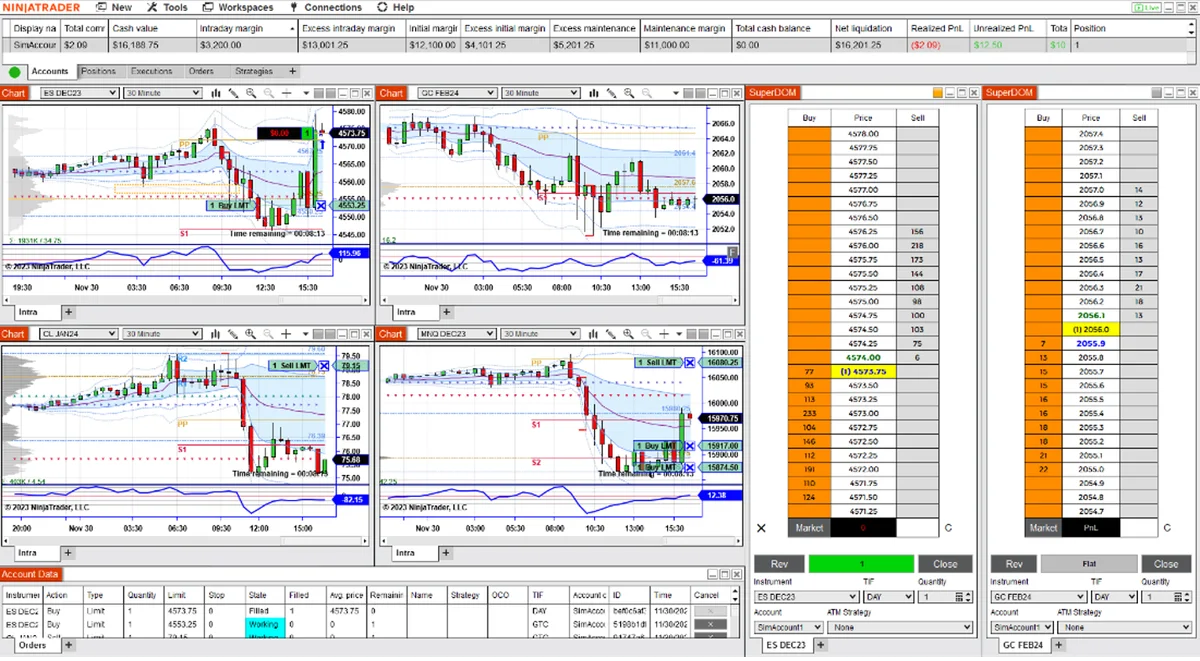
Open Control Center > New > Level II to view bid and ask quantities at multiple price levels. Your active data connection must supply market depth for that instrument. A moving chart or a visible Rithmic account alone does not establish that Level II data is enabled.
For a multi-account workspace, keep three questions separate: which feed supplies the data, which exchange data is enabled on that feed, and which account receives your orders.
What Level II adds
Level I data includes the most recent trade and the best bid and ask. Level II adds the quantities available at other bid and ask prices.
| Display | What the numbers describe |
|---|---|
| Level I quotes | Last trade and the current best bid and ask, with sizes. |
| Level II / market depth | Quantities resting at multiple bid and ask prices. |
| Order Flow Volumetric bars | Executed buying and selling volume within each bar, classified by the selected delta method. |
A large depth number is not a completed trade or a guarantee of your fill. Volumetric bars answer a different question from the current order book. A working footprint-style chart therefore does not, by itself, prove that a depth subscription is active.
Open and configure the Level II window
- From the Control Center, select New > Level II.
- Right-click the window and choose Instruments, or start typing the symbol while the window is selected. For futures, choose the intended contract month.
- Read Quotes for the inside market, Summary for totals by price, and Details for bids on the left and asks on the right.
- Right-click Properties to adjust Number of price levels - summary and Number of price levels - detailed. Also check that the sections you want are visible.
The window guide explains the layout; the properties reference covers row and section settings.
Displaying more rows does not purchase additional market data. If quantities are absent beyond the inside market, check the feed’s entitlement as well as the layout.
Check missing Rithmic market depth
Start with the symptom:
- No quotes anywhere: use the Rithmic login and blank-chart checks. Confirm the instrument and current connection before changing depth settings.
- Quotes move, but depth is missing: ask the firm or broker that issued your Rithmic login whether market depth is enabled for that instrument’s exchange. Identify the actual login and account track; another account’s subscription is not evidence for this one.
- Only a few levels are visible: inspect the Level II row settings. The number of rows requested and the number of levels supplied are different things.
- Depth is missing only in practice: check the recording. Historical playback lacks Level II data; Market Replay can contain it.
Ask the account provider about its available data package and charges. Do not apply a NinjaTrader Brokerage price table to every prop-firm or brokerage Rithmic account.
Check the data connection separately from the trading account
NinjaTrader’s multiple-connection rules explain that connection order and preferred-data settings determine the feed used for each instrument type. Orders still go to the selected trading account.
Inspect Tools > Options > Market Data > Preferred connections - real-time for Futures. Historical preferences are separate. The platform does not automatically switch to a second feed merely because the first lacks an exchange entitlement when that first feed supports the instrument type.
For example, selecting a different account in an order-entry window is not a reliable way to change the depth feed. Check the data configuration directly. The multiple-Rithmic connection guide covers managing separate logins.
PropFirmConnector connects any Rithmic account to NinjaTrader 8. It supplies the connection layer; exchange-data entitlements and display settings remain separate. Use the connection guides for account setup.
When a depth map differs from the ladder
NinjaTrader’s Order Flow Market Depth Map requires Level II data and records the largest depth received at each price within a bar. Its chart can differ from the current ladder because it summarizes a period of activity.
The indicator’s configured depth cannot exceed what the provider supplies. Check the tool’s data requirement before treating every Order Flow feature as the same display.
Documentation reviewed October 21, 2026. The workspace image is illustrative; no live-account, data-speed or fill-quality test is claimed.
PropFirmConnector publishes this article and sells the Rithmic connection add-on described on this site.