Real live on Rithmic
Earn2Trade distinguishes real live Rithmic funding from LiveSim and the separate NinjaTrader–Tradovate route.
- NinjaTrader System
Rithmic 01 (Chicago)
PropFirmConnector required — including one live login.
Earn2Trade real live Rithmic accounts require PropFirmConnector for NinjaTrader 8 and System Rithmic 01 (Chicago). Evaluation and LiveSim Rithmic accounts use System Earn2Trade. NinjaTrader–Tradovate subscriptions use a separate native route.
PropFirmConnector is an independent third-party add-on and is not affiliated with or endorsed by Earn2Trade, NinjaTrader, or Rithmic.
Earn2Trade distinguishes real live Rithmic funding from LiveSim and the separate NinjaTrader–Tradovate route.
Rithmic 01 (Chicago)PropFirmConnector required — including one live login.
LiveSim is simulated funding. Use PropFirmConnector with System Earn2Trade. Native Rithmic access depends on your NinjaTrader license.
Earn2TradeNinjaTrader–Tradovate subscription? Use that account’s native connection and issued trading credentials. Official setup.
Have your live Rithmic login ready. Complete live onboarding and confirm the account appears in R|Trader Pro. Your website and NinjaTrader application logins are separate.
Find the separate Rithmic credentials email. For an evaluation, sign in to R|Trader Pro using System Rithmic Paper Trading and the Chicago gateway. For LiveSim, use the server specified in its onboarding instructions. For a real live Rithmic account, use its live login with System Rithmic 01 and the Chicago gateway. Accept pending market-data agreements and confirm the issued account appears. Close R|Trader Pro after this check; the direct connection below does not need it running.
From your PropFirmConnector account, download PropFirmConnector.zip and close NinjaTrader completely. Extract the ZIP, then copy NinjaTrader.Custom-pfc.dll to My Documents\NinjaTrader 8\bin\Custom. Start NinjaTrader again and, when your browser opens, click Activate this device.
Open your account downloadsNo license yet? Start the free 7-day trial, then download PropFirmConnector from your account.
Start NinjaTrader 8 and sign in with your NinjaTrader account credentials when prompted. These are your NinjaTrader credentials, not the Rithmic username and password issued by Earn2Trade.
In the NinjaTrader Control Center, select Connections, then configure. Select Rithmic for NinjaTrader Brokerage, enter the Rithmic username and password for your account, and give the connection a recognizable name. Select Earn2Trade for the evaluation or simulated-funded route, or Rithmic 01 (Chicago) for a real live Rithmic account. Leave Connect on start up and Plug-in mode off, then click OK. PropFirmConnector must be installed and activated for the live connection.
Earn2TradeThe Username and Password are case-sensitive.
Rithmic 01 (Chicago)The Username and Password are case-sensitive.
Open Connections again and click the connection name you just created. A green status indicator and the account appearing in NinjaTrader confirm the connection.
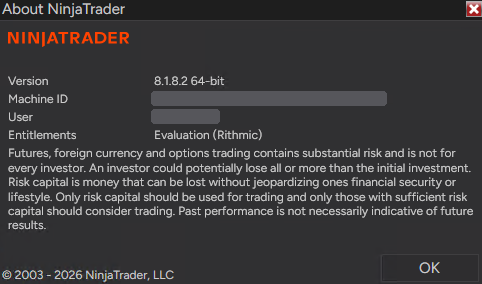
If Evaluation (Rithmic) is missing:
@APE-XTRA-DERF-UNDI-183T-PR45-LW27-63GE Rithmic account not showing in NinjaTrader: the full fix, step by step →
Earn2Trade ended its firm-provided legacy NinjaTrader/Rithmic route on June 30, 2026. Its new bundled NinjaTrader access uses the NinjaTrader–Tradovate signup option. The announcement retains an exception for customers with their own NinjaTrader license with Rithmic integration. PropFirmConnector still needs active Rithmic credentials; installing it cannot reactivate an account terminated by the firm.