Moved to a Live Rithmic Account? Keep Your NinjaTrader Setup
Moving from Tradovate or Rithmic Paper Trading to a live prop account? Keep your NinjaTrader charts, indicators and strategies with PropFirmConnector.
On this page
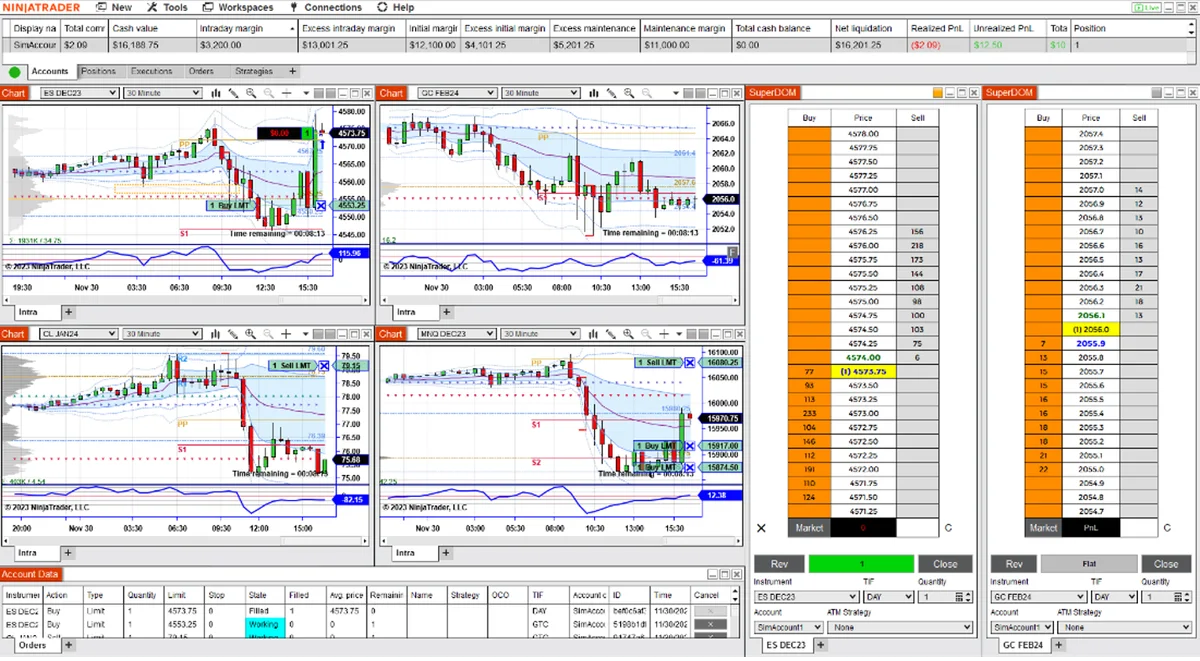
You can keep using NinjaTrader 8 when your prop firm moves you to a real live Rithmic account. Install and activate PropFirmConnector, then connect the live Rithmic credentials using Rithmic 01 (Chicago). The add-on is required for this live connection even when you have only one Rithmic login.
That means you can keep the workspace, charts, indicators and strategy tools you used during evaluation and simulated funding. A new live account still needs to be selected in your order windows and strategies; keeping your setup does not transfer the old account’s balance, positions or permissions.
What changes when a prop firm moves you to live?
Passing an evaluation, becoming funded and receiving payouts do not necessarily mean you are trading a real live account. A simulated-funded account can pay rewards while the trading account remains simulated. The live transition happens when the firm completes its live onboarding and issues the live account. For Halcyon account-stage and connection checks, use the Halcyon setup guide.
For Humble’s account-stage settings and transition checks, use the Humble connection guide.
Two connection changes can catch NinjaTrader users by surprise. Both lead to a separately issued real live Rithmic account:
| Earlier connection | New live connection in NinjaTrader |
|---|---|
| Tradovate/CQG simulation | New Rithmic credentials, PropFirmConnector and Rithmic 01 (Chicago). Your old Tradovate connection does not connect this account. |
| Rithmic simulation, often Rithmic Paper Trading | Live Rithmic credentials, PropFirmConnector and Rithmic 01 (Chicago). The provider stays Rithmic; the account environment changes. |
Already using PropFirmConnector for your simulated accounts? Keep the same add-on and configure the live connection. If you previously used a native NinjaTrader simulation connection, the new live Rithmic account requires the add-on.
Why an evaluation platform list can be misleading
Funded Futures Family’s platform guide includes NinjaTrader simulation and Tradovate setup. Its separate live migration policy describes moving to Rithmic infrastructure after review and broker paperwork. Eligibility starts that process; it does not make the live account immediately ready. See the FFF live connection guide once your live credentials arrive.
Elite Trader Funding’s LIVE ELITE documentation lists Rithmic platforms and says Tradovate and NinjaTrader are not currently supported in that program. That is the firm’s published platform support position. Our Elite live Rithmic guide explains the independent PropFirmConnector connection; it does not imply firm endorsement or change the firm’s trading rules.
Not every live account moves to Rithmic. Lucid Trading documents both Tradovate Live and Rithmic Live accounts. A Tradovate/CQG live account uses its separate native NinjaTrader route. PropFirmConnector connects an existing Rithmic login; it does not convert a Tradovate account into Rithmic. Use the Lucid account-stage guide to match the feed actually issued to you.
Keep your charts, indicators and strategies
Your chart layouts, templates and installed NinjaScript tools belong to your NinjaTrader installation. You do not need to rebuild that workspace in another platform just because your firm changes the account’s feed. PropFirmConnector supplies the live Rithmic connection inside NinjaTrader.
Before changing connections:
- Save and back up your setup. Save the workspace. With no trades, working orders or active strategies depending on the connection, disconnect and use Tools > Export > Backup File. Include Workspaces, Templates and NinjaScript files; NinjaTrader’s backup guide explains these options.
- Complete live onboarding. Use the live account’s Rithmic credentials, complete its agreements and confirm the account appears in R|Trader Pro. Signing in to the NinjaTrader application opens the platform; the live Rithmic credentials connect the trading account.
- Install and activate PropFirmConnector. Follow your firm’s live Rithmic connection guide, including Multi-provider setup when required by your NinjaTrader version.
- Add the live connection. In Connections > Configure, use Rithmic for NinjaTrader Brokerage, the issued live credentials, Rithmic 01 (Chicago) and Plug-in mode off. Use a clear connection name so you can distinguish it from your simulated account.
- Select the live account deliberately. Check the account in Chart Trader, SuperDOM and any strategy configuration. Keep automated strategies disabled while you change their account and review their settings. Confirm market data, instrument subscriptions, contract limits and the firm’s live automation rules before enabling them.
Existing indicators and strategies must remain compatible with your NinjaTrader version, licenses and available data. A live connection does not guarantee the same fills or strategy results as simulation, and the add-on does not grant permission to use automation where a firm restricts it.
If the live account does not appear
Check the live credentials and Rithmic 01 (Chicago) first, then confirm PropFirmConnector is installed and activated. A payout-eligible simulated account still uses its simulated environment; changing its System cannot turn it into a live account.
If the account is missing in R|Trader Pro too, ask the firm or live broker to confirm onboarding and account access. If it appears there but NinjaTrader rejects the connection, use the Rithmic login troubleshooting guide.
If the connection turns green but NinjaTrader’s Accounts tab still lists only Sim101, open Help > About. When Entitlements doesn’t show Evaluation (Rithmic), your NinjaTrader login can’t list Rithmic accounts. Importing one license key fixes it once for every account: see Rithmic account not showing in NinjaTrader.
Firm policies and NinjaTrader backup documentation checked September 23, 2026. Connection instructions describe the PropFirmConnector workflow; this article is not a live trading or strategy-performance test.
PropFirmConnector publishes this article and sells the Rithmic connection add-on described on this site.