Futures Margin vs Prop Firm Drawdown in NinjaTrader
Separate NinjaTrader brokerage margin from prop-firm drawdown, calculate a hypothetical remaining allowance, and check each Rithmic account's limits.
On this page
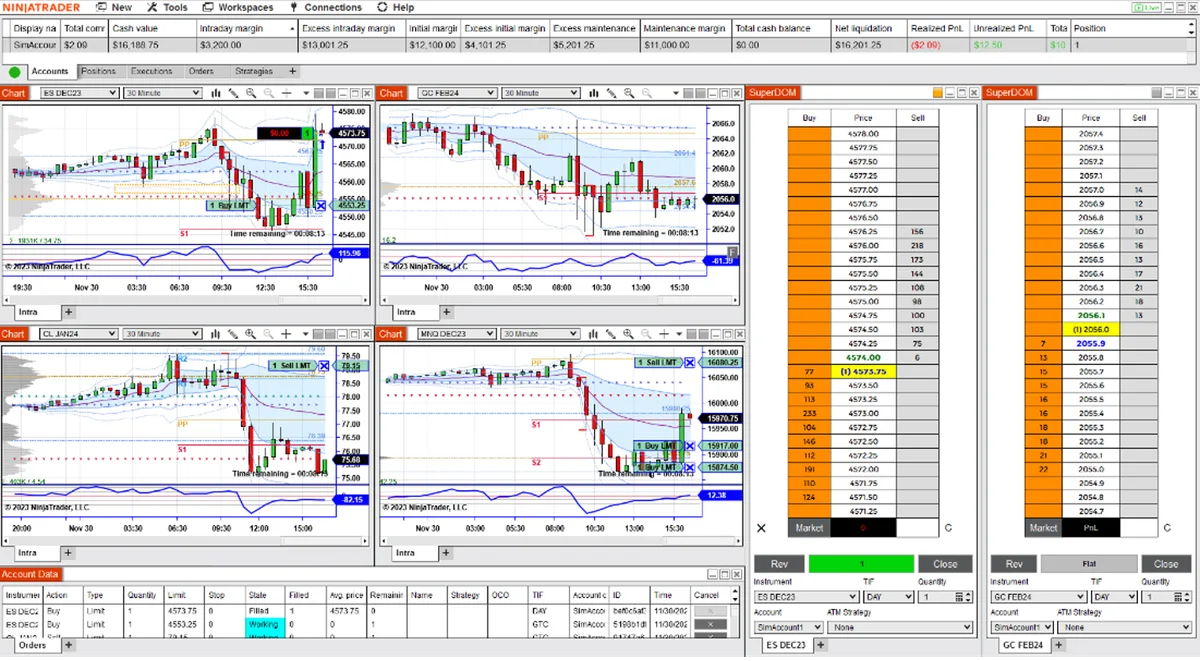
Margin is the funding required to support a futures position. A prop firm’s drawdown threshold is an account loss boundary. Both can affect whether you can continue trading, but they are different calculations. Connecting a Rithmic account to NinjaTrader does not make NinjaTrader Brokerage’s published margin schedule that account’s rulebook.
Identify which account’s rules apply
| Account you are using | Where to check the limits |
|---|---|
| Your own live brokerage account | The broker’s current contract margins, session cutoffs and position limits. |
| An issued prop-firm account | The firm’s rules for that exact program and stage, plus any applicable broker requirements. |
| Local Sim101 | NinjaTrader’s local simulation settings and assigned Risk Template. These are practice settings. |
Identify the account provider, program and stage before comparing numbers. A firm’s evaluation, simulated-funded and live accounts can have different rules. Its advertised account size is not a statement of how much you may lose.
For example, LucidDaily’s documentation allows either end-of-day or intraday drawdown during evaluation, while its funded stage uses intraday drawdown. That is a LucidDaily rule, not a rule for every Lucid program or live account. The Lucid connection guide separately explains its account and platform routes.
Read margin by contract and trading session
CME defines futures margin as money kept with the broker to support the position, rather than a down payment on the underlying asset. Initial margin is the amount required to initiate a position; maintenance margin is the minimum that must remain in the account. The broker may require additional funds.
A broker can also publish an intraday margin schedule. For NinjaTrader Brokerage, the current policy applies intraday rates until 15 minutes before the product’s session close, when initial margin is required. The product’s cutoff matters; there is no single closing time for every futures market.
Use the provider’s current contract table and notices. NinjaTrader can raise margins during volatility or around economic announcements. An account that fails its margin requirements can face liquidation and fees. Its brokerage guidance also says the account needs sufficient funds for commissions and fees.
These brokerage rules do not replace a prop firm’s drawdown or daily-loss rules. A chart’s session template does not set the provider’s cutoff; see the NinjaTrader trading-hours guide for that distinction.
Drawdown allowance and the current threshold are different numbers
A trailing drawdown can move the loss threshold upward as the account reaches a new high. The rule must specify which high counts, when the threshold moves, and whether it eventually stops trailing.
LucidDaily’s drawdown explanation distinguishes a threshold that follows real-time P&L from one based on session-end P&L. Its customization page explicitly includes unrealized gains and losses in the intraday calculation. An open profit can therefore matter before a trade closes.
Consider this hypothetical intraday trailing account, before any threshold lock. Assume its rule follows the highest account equity, including open P&L:
| Item | Hypothetical amount |
|---|---|
| Starting account equity | $50,000 |
| Trailing drawdown allowance | $2,000 |
| Highest equity reached | $51,200 |
| Current loss threshold: $51,200 − $2,000 | $49,200 |
| Current equity after giving back part of the gain | $50,600 |
| Distance above the threshold: $50,600 − $49,200 | $1,400 |
The account is still $600 above its starting value, but only $1,400 above its current threshold. The $2,000 allowance is not the amount currently remaining, and the $50,000 account label is not a loss budget.
This example explains the arithmetic, not a recommended position size or a prediction of a liquidation fill. Use the provider’s actual treatment of fees, open P&L, threshold locks and withdrawals. Check separately when an end-of-day threshold is recalculated and when breaches of the existing threshold are enforced. A daily loss limit may be another restriction.
Check the values in NinjaTrader and with the provider
In Control Center → Accounts, identify the account row and connection. Right-click the grid and open Properties to choose columns.
The Accounts tab documentation includes Net Liquidation, Excess Intraday Margin and Trailing max drawdown. These answer different questions; unused margin is not interchangeable with remaining drawdown.
NinjaTrader also warns that providers do not all transmit complete account data. A missing value is not evidence of unlimited trading room. If a value is absent or unclear, use the firm’s dashboard, current rules and account records to establish the limit before relying on the display.
For a multi-account copying workflow, repeat the check for every follower. Accounts with the same label or copied entries can have different balances and thresholds. Compare the actual contract and quantity too; micro and E-mini exposure is a separate calculation from margin.
Local Risk Templates do not change a firm’s limits
NinjaTrader’s Risk window defines margin and contract limits for local simulation accounts. Editing a template on Sim101 does not change an issued prop account’s loss threshold or a broker’s requirements. Use the simulation-account guide to distinguish local practice from an issued Rithmic account.
PropFirmConnector connects any Rithmic account to NinjaTrader 8. It supplies connections, not a substitute trade copier or a change to the account provider’s risk rules. Use the connection guides for setup.
Documentation reviewed October 28, 2026. The calculation is hypothetical; no live-account, liquidation or fill-quality test is claimed.
PropFirmConnector publishes this article and sells the Rithmic connection add-on described on this site.