NinjaTrader Strategy Analyzer: Backtest Settings and Fills
Run a NinjaTrader Strategy Analyzer backtest with clear data, fill-resolution and cost settings, then save a baseline for a useful comparison.
On this page
NinjaTrader Strategy Analyzer runs historical tests of automated NinjaScript strategies. Before interpreting a result, establish which data generated the signals, how the test simulated fills, and which costs it included. Save that combination so a later run answers a specific comparison.
Open it from Control Center > New > Strategy Analyzer. NinjaTrader’s Analyzer overview describes its historical-analysis role; it does not place this backtest’s orders in your Rithmic account. To use an installed strategy with incoming data, select its execution account and review its startup behavior.
Set up one baseline backtest
Start with a strategy whose inputs you understand. NinjaTrader includes sample strategies for exploring the controls; choosing one is not evidence of a profitable trading approach.
In the backtest settings:
- Select Backtest as the test type and choose the strategy.
- Set its parameters, instrument and Data Series bar type and value.
- Choose the start and end dates and Trading hours template.
- Review the fill and cost settings below, then select Run.
Record the contract month, session and dates with your result. Comparing two runs across different expiries or sessions can answer a different question from the one you intended.
The Analyzer normally requests historical data from the provider. Properties > Use local data only restricts it to stored records; it does not create missing history. Check the stored historical data before relying on that option. Analyzer properties
Separate strategy bars from simulated fills
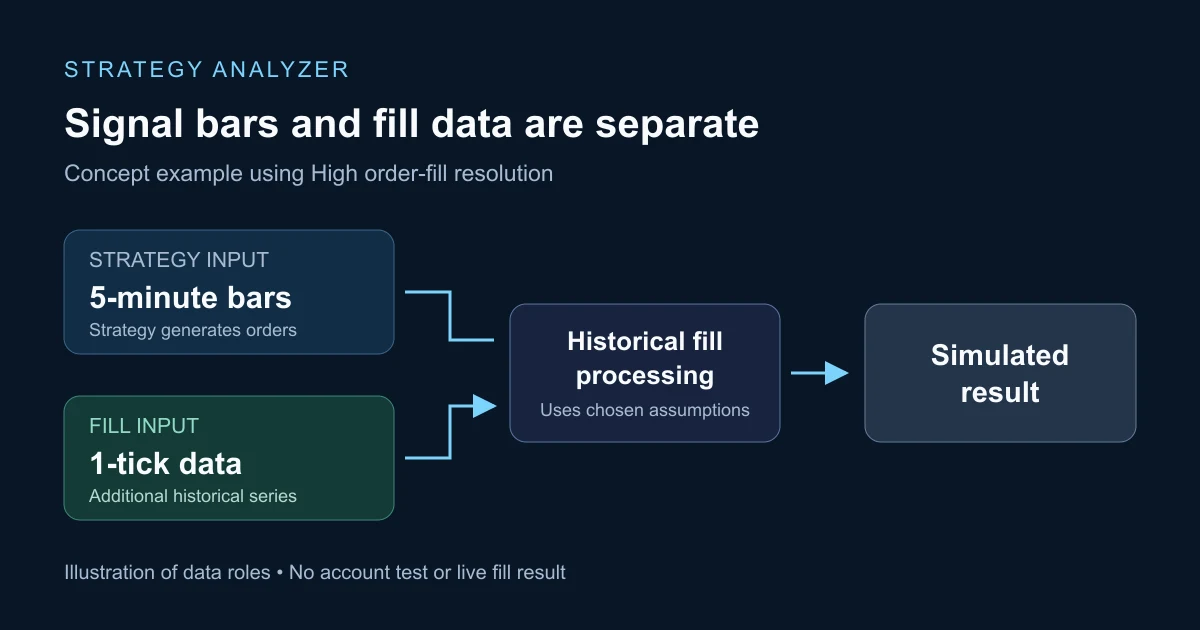
Order fill resolution determines how historical orders are filled. It is a separate choice from the primary bars used by the strategy.
| Resolution | What supplies the fill calculation | What to check |
|---|---|---|
| Standard | The primary bars’ open, high, low and close, processed through NinjaTrader’s assumed intrabar path. | A bar does not reveal the full sequence of trades within it. |
| High | An additional, more granular data series used for fills. | The extra history must be available, and loading it adds work. |
For example, a five-minute strategy can use a one-tick series for High fill processing. That does not, by itself, make the strategy calculate its signals on every tick.
NinjaTrader documents that High fill resolution cannot be combined with Tick Replay or used with multi-time-frame or multi-instrument strategies. Those scripts need an appropriate design for their historical execution logic; the setting is not a universal accuracy switch. Historical fill processing
Use the Tick Replay calculation guide when the question concerns historical script events rather than the fill model.
Make cost assumptions visible
Enable Include commission when your comparison is intended to include commissions, and inspect the resulting charge. A zero amount is a reason to check your configuration before treating the result as net of expected costs.
Slippage is entered in ticks and applies to market, stop-market and market-if-touched executions. The Summary displays slippage in points. Fill limit orders on touch also changes the fill assumption. Record these settings with the run. Backtest property definitions
NinjaTrader’s commission templates define global or per-instrument rates. The commission reporting guide explains their use in local account reports. Estimated backtest costs are inputs to inspect, not a broker statement or a measurement of future execution.
Save the run before changing settings
Right-click the Analyzer and enable Show Log. Its backtest log retains run records, supports notes and pinned entries, and lets you restore a run’s parameters by double-clicking it.
Use a note that identifies your question, such as “same strategy and date range; compare Standard fills with High, one tick.” Keep the original result, change that setting, and run again. A difference then has a specific setting to investigate. Changing the strategy, session, history range and cost assumptions together makes the comparison harder to explain.
Also retain the strategy version and any developer instructions. NinjaTrader can preserve a source-code snapshot for open, unlocked strategies; that does not provide a code snapshot of a vendor-protected strategy.
Interpret the result within its limits
Backtests, Playback, simulation and live trading use different execution conditions. NinjaTrader’s discrepancy reference identifies fill models, data differences and bar construction as reasons results can diverge.
A completed run establishes what that strategy produced under the recorded historical assumptions. It does not verify live fills, latency, future profitability or compliance with a prop firm’s risk rules. If your task is rehearsing order-entry controls against a recorded session, follow the Playback101 practice guide.
PropFirmConnector connects any Rithmic account to NinjaTrader 8. The connection guides cover account connectivity; an Analyzer result does not test that connection.
Documentation reviewed November 16, 2026. No live-account or execution-quality test is claimed.
PropFirmConnector publishes this article and sells the Rithmic connection add-on described on this site.